
What you’ll need
Before setting up a HACC client for claiming, make sure:- The HACC Agency ID is set up under Settings → Company Info, or under Maintenance → Areas if your organisation has multiple IDs
- The applicable service type and category are applied to HACC and SCP services in Maintenance → Services
Setting up a HACC client
1
Set the funding type
Open the client’s profile and select HACC from the Funding Type drop-down.
2
Open the CHSP/HACC tab
Navigate to Client Profile → CHSP/HACC tab.
3
Configure the DEX section
In the DEX section, select the HACC option. Visualcare automatically generates the client’s SLK code.Update all relevant HACC fields and click Save.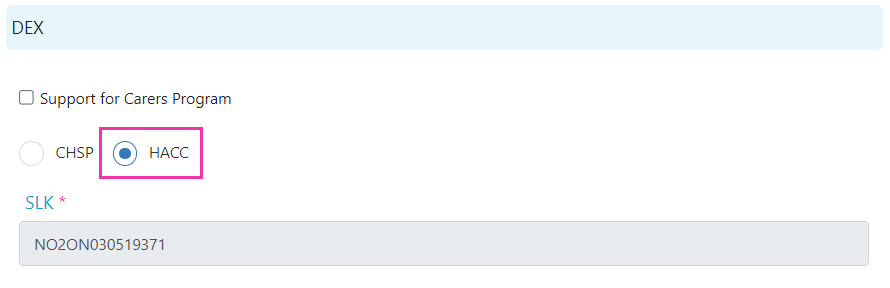
4
Set up the carer (if applicable)
If the client has a carer, set them up as a contact under Client Profile → Contacts tab.From the CHSP/HACC tab, once the contact is selected and the profile saved, click the icon beside Carer to edit and complete the relevant HACC fields within the contact profile. You can also access the contact profile by clicking the contact name under the Contacts tab, or by navigating to Maintenance → Contacts.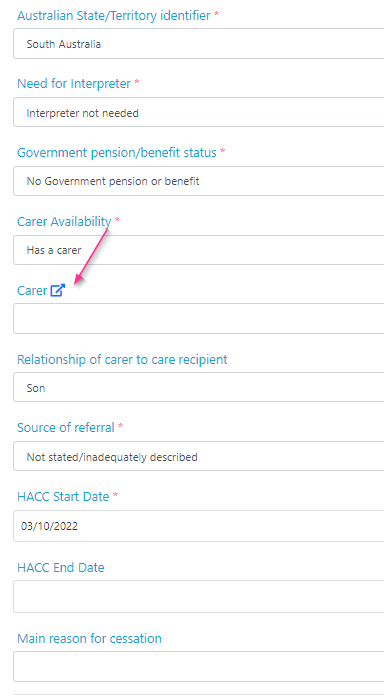
Support for Carers Programme (SCP)
If the client is eligible for SCP funding, tick the Support for Carers Program box on the CHSP/HACC tab. If the client has funding for both SCP and CHSP, keep CHSP selected as the funding type. You don’t need to switch it to HACC. The relevant HACC SCP questions appear alongside CHSP fields in the DEX section.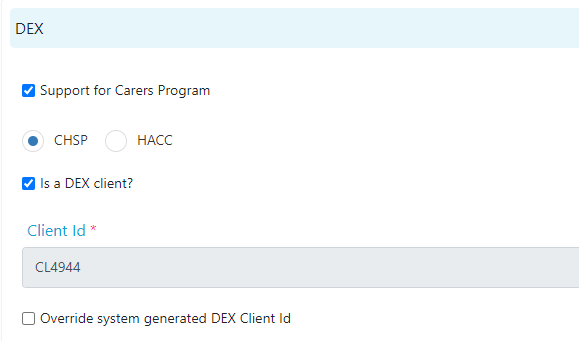
Exporting HACC and SCP claims
Once the client profile is set up and shifts have been confirmed on timesheets, export the claim data from Timesheets → Data Export.Next steps
After setting up the HACC or SCP fields on the client profile, create the client’s agreement. See Creating agreements for rostering for the full process.Running into issues?
See Finance troubleshooting for common errors and fixes.Related articles
Claiming and invoicing overview
Overview of all billing and export options in Visualcare
Billing to CHSP
Submit Commonwealth Home Support Programme claims via DEX
CHSP agreements
Set up CHSP agreements for rostering and claiming