
Setting up vAssessment access
A web username login is required for the worker to access the vAssessment portal. This is set up on the worker profile in VCore.1
Enable web access on the worker profile
Open the worker profile in VCore. The worker’s email address can be used as the web username. Ensure Web Enabled is ticked. These login details are the same as those used for the Vworker mobile app.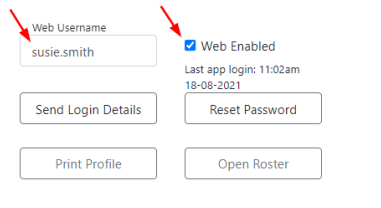
2
Share the portal URL
The vAssessment portal is accessed at assessment.visualcare.com.au.
Signing in
Workers sign into the vAssessment portal using: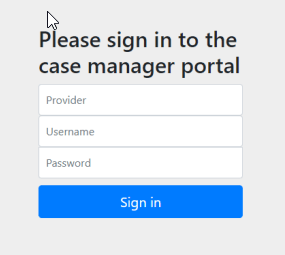
Home page
The home page displays a list of the worker’s clients.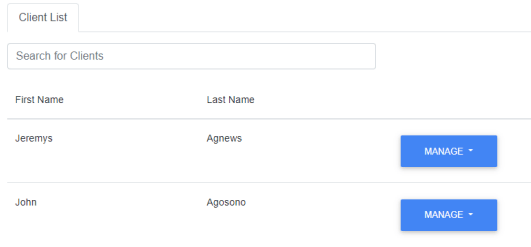
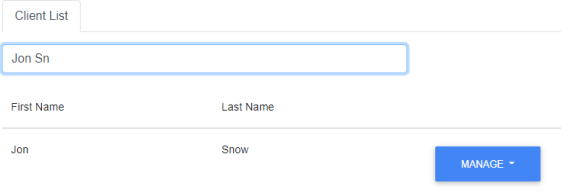
- Client Details - view and edit client information
- Roster - view and manage the client’s roster
- Templates - access assessment templates
- Quote - create and manage quotes
- HCP Quote - create and manage Home Care Package quotes
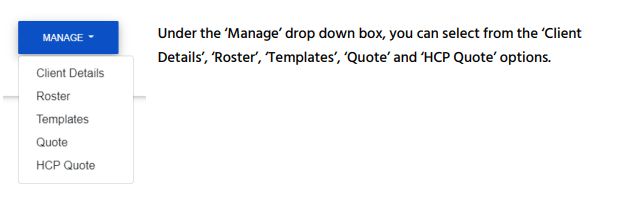
Navigation
Once you’re in one of the sections listed above, you can switch between the other sections for the same client using the tabs at the top of the screen.
Client details
Under the Client Details tab, you can view and edit client information. When you save this information, it’s sent to the Visualcare client profile in VCore.
Running into issues?
See General troubleshooting for common errors and fixes.Related articles
vOnboard
The worker onboarding portal
vBroker
The broker portal for managing subcontracted shifts
Creating a worker profile
Setting up a new worker in VCore
vGo
The mobile app for office users managing shifts on the go