> ## Documentation Index
> Fetch the complete documentation index at: https://support.visualcare.com.au/llms.txt
> Use this file to discover all available pages before exploring further.
# Managing training items
> Track and manage worker training and qualifications on their profile in Visualcare
The training and qualifications tab on a worker profile tracks completed training, certifications, and qualifications. Like skills, training items are also used when searching for workers during rostering.
## Adding and editing training items
Open the worker's profile and navigate to the **Training and Qualifications** tab in the lower section of the screen.
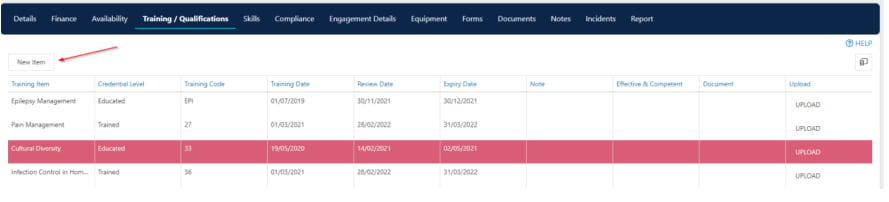 * Click **New Item** to add a new training record
* Double-click an existing item to edit it
* Enter details such as the training item name, completion date, and expiry date where applicable
Training items are configured in **Maintenance** → **Workers** → **Training Items**. Forms relevant to a training item are linked using the **Template** drop-down. See [Compliance workflows and settings](/worker-management/compliance-workflows-and-settings) for details on configuring training items.
## Running into issues?
See [Worker management troubleshooting](/troubleshooting/general) for common errors and fixes.
## Related articles
Add skills to a worker profile
Track compliance items on a worker profile
Configure training items in Maintenance
* Click **New Item** to add a new training record
* Double-click an existing item to edit it
* Enter details such as the training item name, completion date, and expiry date where applicable
Training items are configured in **Maintenance** → **Workers** → **Training Items**. Forms relevant to a training item are linked using the **Template** drop-down. See [Compliance workflows and settings](/worker-management/compliance-workflows-and-settings) for details on configuring training items.
## Running into issues?
See [Worker management troubleshooting](/troubleshooting/general) for common errors and fixes.
## Related articles
Add skills to a worker profile
Track compliance items on a worker profile
Configure training items in Maintenance