> ## Documentation Index
> Fetch the complete documentation index at: https://support.visualcare.com.au/llms.txt
> Use this file to discover all available pages before exploring further.
# Client reports
> Run reports on client data including funding, agreements, compliance, contacts and more.
The **Client Reports** section in Visualcare gives you a central place to pull reports on client data. You'll find reports covering everything from funding balances and agreement details through to compliance items, contact lists and service history.
Access client reports from **Reports** → **Client Reports** in the main menu, or from the **Reports** tab within an individual client profile.
## Reports available from the client profile
The **Reports** tab within a client profile provides reports specific to that client.
### Funding and operational balances
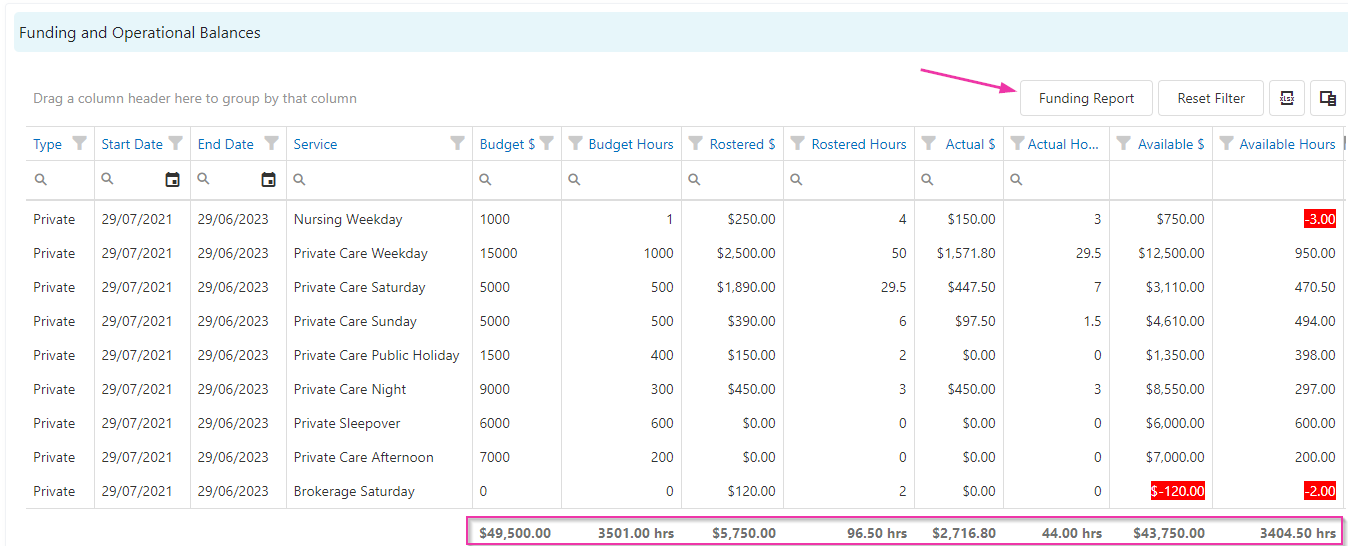
This table reports on the client's budget as set up in the **Agreement** tab. It draws on client roster and confirmed timesheet data.
| Column | What it shows |
| -------------- | ------------------------------- |
| Rostered hours | Hours from the client roster |
| Budget hours | Hours from the client agreement |
| Actual hours | Hours from confirmed timesheets |
Totals display at the bottom of the table.
 ### Funding report
To run a funding breakdown report from the client profile:
1. Click **Funding Report**
2. Select the date range
3. Choose a funding type (leave blank to include all)
4. Enter the funding amount
5. Choose a specific service or leave on all services
6. Click **Reload** to generate the report
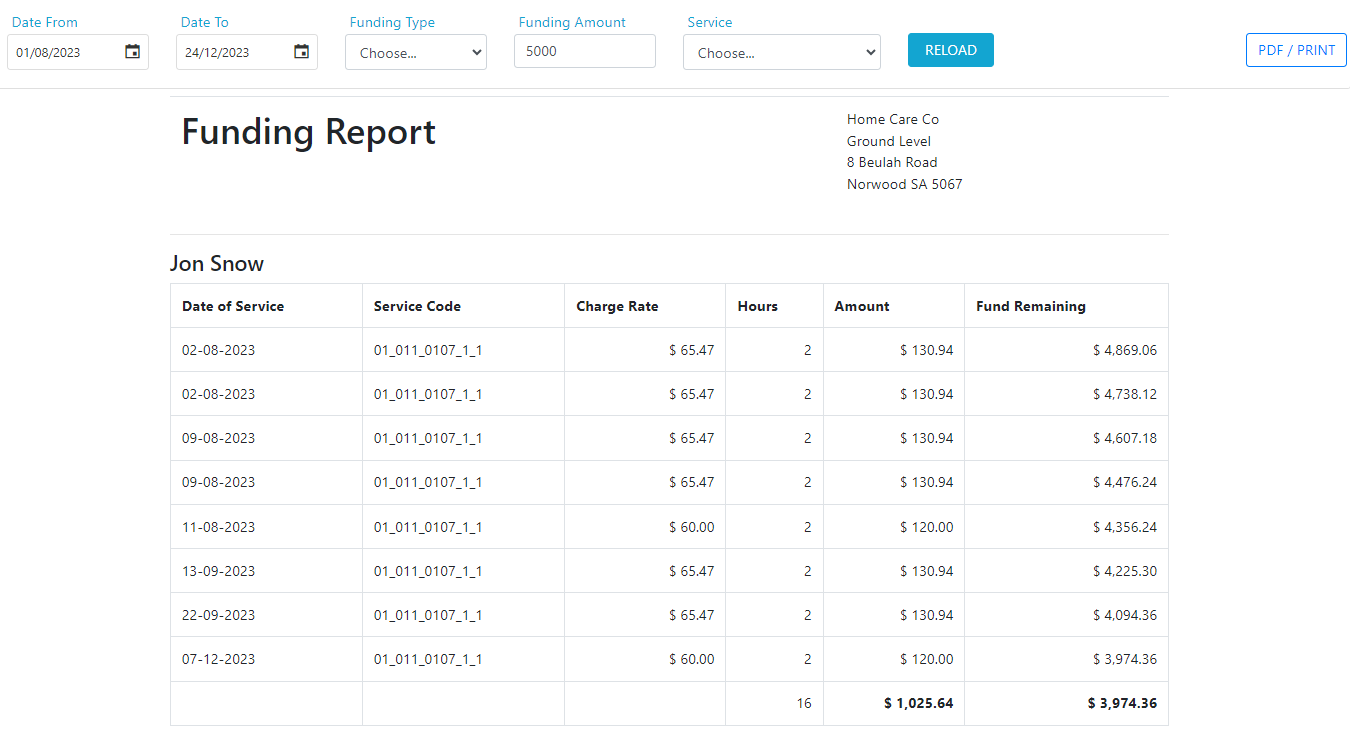
### Funding report
To run a funding breakdown report from the client profile:
1. Click **Funding Report**
2. Select the date range
3. Choose a funding type (leave blank to include all)
4. Enter the funding amount
5. Choose a specific service or leave on all services
6. Click **Reload** to generate the report
 ## Reports available from the reporting module
The following reports are available under **Reports** → **Client Reports**.
| Report | Description |
| ----------------------------- | ---------------------------------------------------------------------------------------------------------------------- |
| Client Review Dates | Report on client review dates for specific timeframes |
| Client Agreement and Services | Report on agreements and services for a specified timeframe, with filters for client, agreement type, area or division |
| Client Birthdays | Report on client birthdays for the coming month or all months |
| Client HCP | Select a month and report on all client Home Care Package statements for that period |
| Client Contacts | List of clients and their contacts |
| Client Communication | Report on last communication with clients, with filters by funding type and area |
| Client Compliance | List of all client compliance items, with filters on **Alert Date** or **Expire Date** |
| Client Distribution | Shows how many clients are receiving services in each suburb |
| Client Last Service/Timesheet | Displays the last scheduled service and the last confirmed shift (timesheet) for each client |
| Client Worker Preference | Search for specific clients or all, and filter by preferred, non-preferred or all |
| Client Documents | Search across all client documents |
Most reports support date range filters, column sorting, and export to Excel for further analysis.
## Running into issues?
See [General troubleshooting](/troubleshooting/general) for common errors and fixes.
## Related articles
Set up new client records in Visualcare
Track and manage client compliance items
Run reports on worker data
Report on rostering and timesheet data
## Reports available from the reporting module
The following reports are available under **Reports** → **Client Reports**.
| Report | Description |
| ----------------------------- | ---------------------------------------------------------------------------------------------------------------------- |
| Client Review Dates | Report on client review dates for specific timeframes |
| Client Agreement and Services | Report on agreements and services for a specified timeframe, with filters for client, agreement type, area or division |
| Client Birthdays | Report on client birthdays for the coming month or all months |
| Client HCP | Select a month and report on all client Home Care Package statements for that period |
| Client Contacts | List of clients and their contacts |
| Client Communication | Report on last communication with clients, with filters by funding type and area |
| Client Compliance | List of all client compliance items, with filters on **Alert Date** or **Expire Date** |
| Client Distribution | Shows how many clients are receiving services in each suburb |
| Client Last Service/Timesheet | Displays the last scheduled service and the last confirmed shift (timesheet) for each client |
| Client Worker Preference | Search for specific clients or all, and filter by preferred, non-preferred or all |
| Client Documents | Search across all client documents |
Most reports support date range filters, column sorting, and export to Excel for further analysis.
## Running into issues?
See [General troubleshooting](/troubleshooting/general) for common errors and fixes.
## Related articles
Set up new client records in Visualcare
Track and manage client compliance items
Run reports on worker data
Report on rostering and timesheet data