> ## Documentation Index
> Fetch the complete documentation index at: https://support.visualcare.com.au/llms.txt
> Use this file to discover all available pages before exploring further.
# Audit report
> Track data changes across Visualcare with the audit report, showing who changed what and when
The audit report in VCore tracks data changes across your Visualcare environment. Use it to see what data has been changed, who made the change, and when it happened. This is useful for internal governance, investigating discrepancies, and maintaining accountability across your team.
This is the data change audit report, not a compliance audit. For compliance-related reports, see [Client audit reports](/compliance/client-audit-reports) and [Worker audit reports](/compliance/worker-audit-reports).
## Running an audit report
To generate an audit report, navigate to **Reports** → **Audit Report**.
1. Select the **module** you want to audit from the drop-down menu (for example, Clients, Workers, Rostering, Timesheets)
2. Set the **date range** for the period you want to review
3. Click **Search** to generate the report
The results display all data changes for the selected module and period, including the user who made each change and the timestamp.
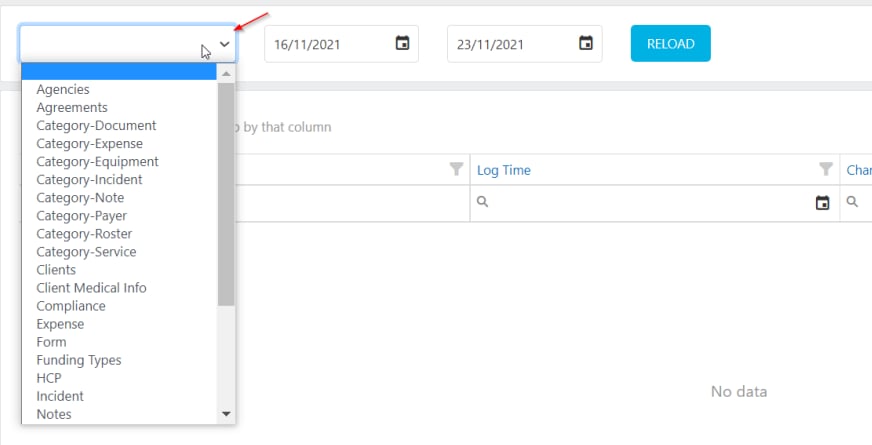 Use the audit report to investigate unexpected changes to client agreements, worker pay rates, or rostering data. Narrowing the date range and module helps you find specific changes faster.
## Running into issues?
See [Compliance troubleshooting](/troubleshooting/general) for common errors and fixes.
## Related articles
Compliance and service reports for your client base
Compliance and training reports for your workforce
Set up compliance items for clients and workers
Use the audit report to investigate unexpected changes to client agreements, worker pay rates, or rostering data. Narrowing the date range and module helps you find specific changes faster.
## Running into issues?
See [Compliance troubleshooting](/troubleshooting/general) for common errors and fixes.
## Related articles
Compliance and service reports for your client base
Compliance and training reports for your workforce
Set up compliance items for clients and workers